There are plenty of ways to customize andimport your Avatarin Disney Dreamlight, but one thing we couldn’t do before was change our names. As someone who likes to roleplay, I hoped to change my name to match my costume, and now we finally can! Here’s how!
How to change your Avatar name in Disney Dreamlight Valley
We’ve been hoping to have away to change our names in Disney Dreamlight Valley for a while now, but the only way to do that included cheats or mods. Now, with the Laugh Floor Update, we can finally do so right through the game menus.
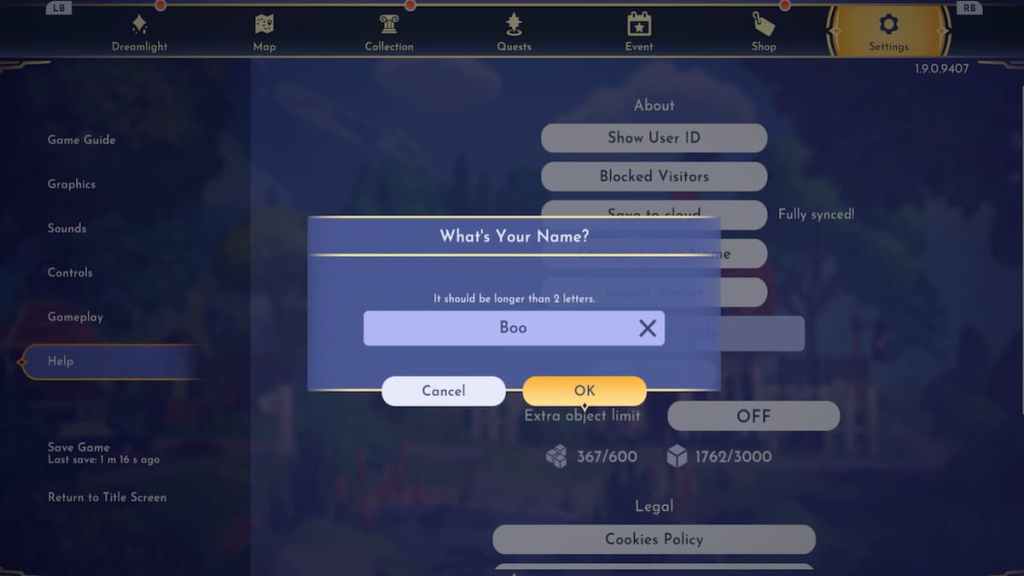
To change your name, open your menu and switch over to theSettingstab. Under the Settings tab, navigate down to theHelpsection. This is where we enter codes and import avatars, and now, you will also find the option toChange Avatar Name.

Related:Disney Dreamlight Valley Codes
you may enter any name, as long as it is appropriate and above two letters long, into the text box and submit it. Changing your name will trigger all characters to start calling you by this name, during story quests or while speaking to them anytime in the Valley.
How many times can you change your name in Disney Dreamlight Valley?
If you happen to change your name but decide you don’t like it down the road, don’t fret! Thankfully, you can change your name anunlimited amount of times. We tested this out and found that we were able to do as many times as we wanted with no restrictions. Now, we can customize our characters and match our names to them however we like!
Looking for more Disney Dreamlight Valley content? Check outHow to unlock Multiplayer in Disney Dreamlight ValleyorIs there crossplay/cross save in Disney Dreamlight Valley?on Pro Game Guides.